What Protect Mode does — and doesn't
Protect Mode keeps mountain safety info, including avalanche risk, on your Lock Screen and Dynamic Island for as long as it's on. It's a live information feed, not a safety net — this guide draws that line clearly before you rely on it.
The problem
Once you're on a run, checking the app means stopping, taking off a glove, and unlocking your phone — exactly the moments you don't have when conditions change fast. Avalanche risk isn't static either: the same region can read differently an hour later.
What Protect Mode does
- A Live Activity for your session. Turning Protect Mode on starts a Live Activity that keeps mountain safety info, including avalanche risk, running on your device.
- Lock Screen and Dynamic Island. That information stays visible without unlocking your phone or reopening the app — glance, don't dig.
Turning it on
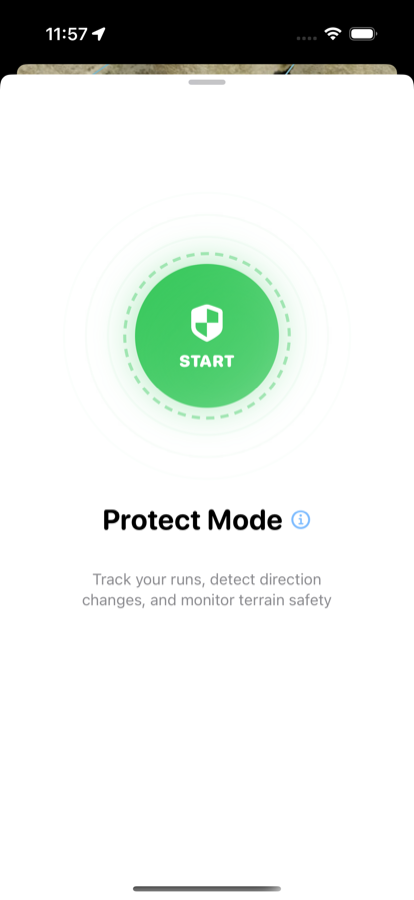
Protect Mode, off
Tap Start on the Protect Mode screen. Once it's on, the Live Activity takes over — check your Lock Screen or Dynamic Island for mountain safety info instead of reopening the app.
What it doesn't do
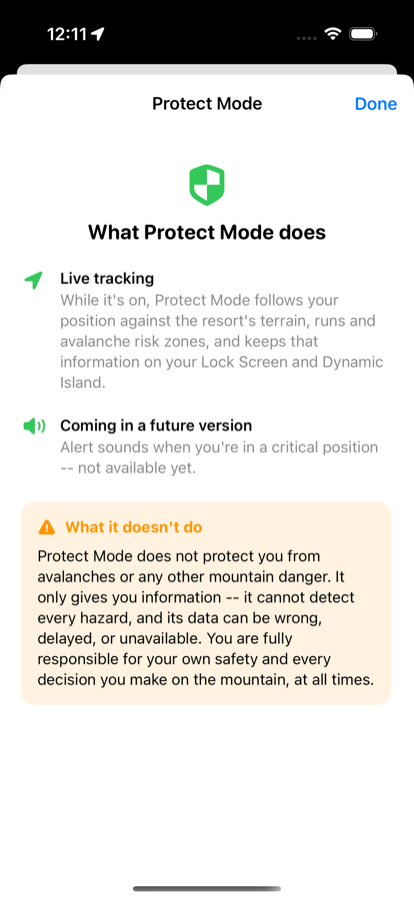
In-app disclaimer
Alert sounds for critical positions are planned for a future version — right now, Protect Mode is a display, not an alarm. Check it the way you'd glance at any Lock Screen widget: informative, not a replacement for reading the terrain and the bulletin yourself.
Free to download · iPhone & Apple Watch
Download on the App Store